Help
Getting started, answers, and a way to reach us. New to ParaBaro? Start with the first question.
Getting started with your Stick
What it is
The ParaBaro Stick is a small unit with no screen. It is the wing recorder on your riser. With its four Nodes it records the pressure inside your wing at two points, one on each side, together with your GPS track and motion data. You read each flight back on your pilot dashboard after you land.
What is in the kit
- The ParaBaro Stick
- Four Nodes, used as two Node pairs: at each measurement point, the Inner Node goes inside the cell and the Outer Node sits on the outside directly opposite.
When you are accepted into the beta we send a setup guide for your Stick and go through it with you on a short call before your first flight. It covers the button and light signals and how to transfer flights for the firmware your Stick ships with.
Add the Stick to your account
Sign in at aviometrics.com and open Add your ParaBaro. Enter the serial number from the label on your Stick; it looks like PB2-000123. From then on, every flight you send is filed under your name.
Charge it
Charge the Stick and all four Nodes fully before your first flight. We have not published a battery figure yet; until we do, charge them before each flying day.
Fit the Nodes to your wing
With the wing laid out on the ground:
- Find the cell. Run a cord along the leading edge from the centre of the wing to the tip, pinch it at the tip and fold the pinch back to the centre: the fold marks halfway. Use the first full cell outboard of that mark, the same cell on both sides, at least one cell inboard of the cells that fold under when you pull big ears. Do not mark the sail.
- Find the spot in that cell. On the bottom surface, measure from the rear edge of the cell opening to the trailing edge, fold the cord in half, then move one hand-width (flat hand, thumb alongside the fingers) forward. Anywhere from halfway to two hand-widths forward is fine. Centre it between the cell's side seams and keep at least 3 cm clear of seams, tabs and tapes.
- Slide the Inner Node in through the cell opening. You cannot reach the spot by hand: put the Outer Node on the bottom surface against it and draw it back through the fabric to the spot.
- Settle the Outer Node on the spot, directly opposite the Inner Node. Its pressure holes must not face forward into the airflow or backwards, and the Inner Node's holes must not face the cell opening. Fit the two sides as mirror images.
- Check that each Node pair holds firmly. Then note the cell number counted from the centre and your two measurements in cm; a photo with the tape in view helps.
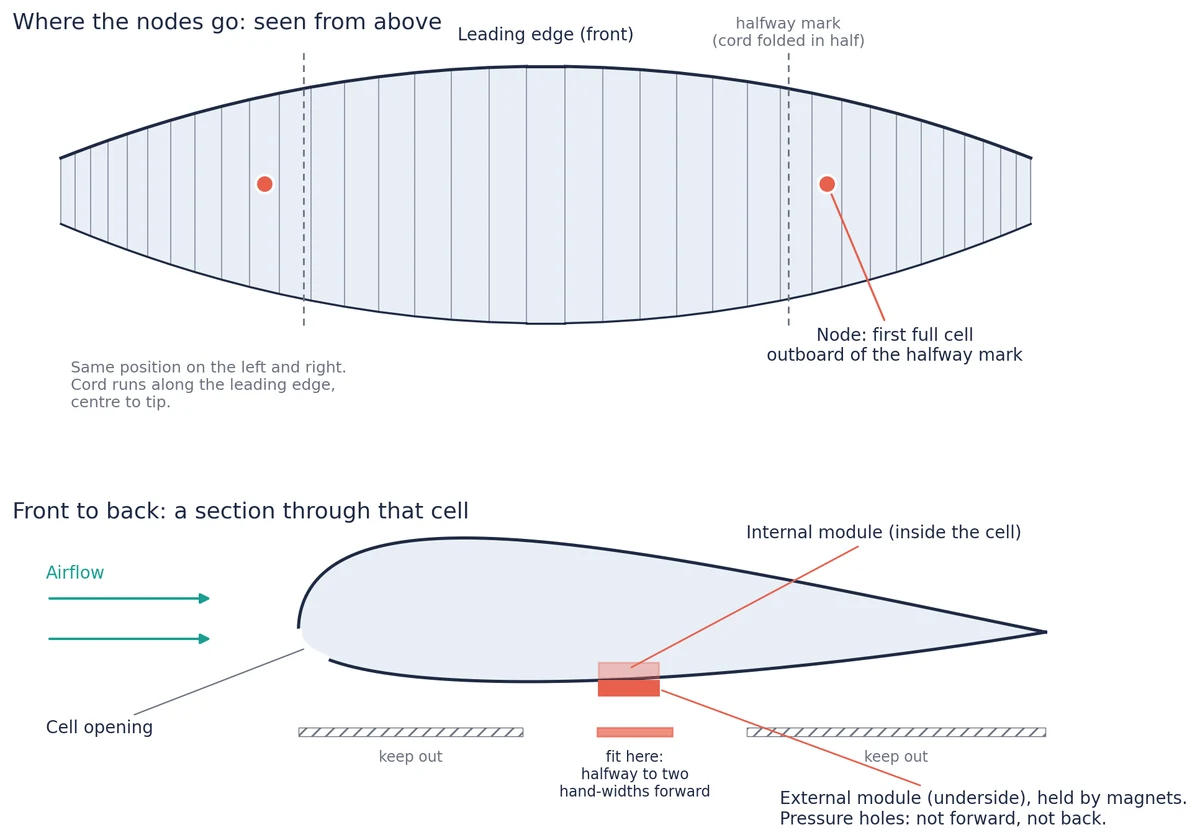
Nothing is cut, sewn or glued, and nothing clips to the risers. The Nodes can stay fitted between flights; take them out for long-term storage.
Fly
Switch the Stick on before you launch. It records each flight on its own. Fly exactly as you normally do.
Before each flight, lift the leading edge at both sensor cells and check that both Nodes are in place and their holes are clear. The Stick cannot tell you if a Node has come off.
After you land
Send your flights to your pilot dashboard as shown in your setup guide. ParaGuru writes a short brief on each one. Sending flights is your choice.
Care
- The Stick and Nodes have no water-resistance rating. Keep them dry and never submerge them.
- Clean them with a soft, dry cloth.
- Take the Nodes out of the wing for long-term storage.
Something not working?
If something does not work, or something in your data looks wrong, tell us. You reach the team directly: contact us.
Questions
About ParaBaro
ParaBaro is the instrument that reads your wing. The kit is the ParaBaro Stick and four Nodes, fitted as two Node pairs. The Nodes measure the pressure inside your wing at two points, one on each side.
The Stick records the pressure inside your wing with your GPS track and motion data, and gives the vario sound in the air. The optional Screen is built to show your airspeed against trim, estimated netto and wind while you fly. Each value is switched on only after it has passed our checks on beta flights; until then its field stays blank. Airspeed and estimated netto are blank while you circle.
After you land, you read the flight on your pilot dashboard, and ParaGuru explains it in plain words.
In flight, the only sound is the vario. ParaBaro is not a safety device and gives no warnings. Fly your normal instruments and your normal judgement.
The Stick has its own vario sound. Keep your own vario and flight app too, if you like. The only flight app we have tested with ParaBaro is XCTrack. With anything else, it is not tested yet.
The only flight app we have tested it with is XCTrack. With any other app or device: not tested yet.
No. ParaBaro is not a certified flight instrument and not an IGC-approved flight recorder, so its tracks are not valid for FAI badges or records.
The kit and your wing
The ParaBaro Stick and four Nodes. The Nodes work in pairs, one Node pair at each of the two measurement points, held together through the fabric by magnets.
One Node pair sits on each side of the wing, at the same place on both sides, held together through the fabric by magnets. Nothing clips to the risers. The first fit takes longer because you measure the spot; after that the Nodes can stay in place between flights.
When you are accepted we send a setup guide and go through it with you on a call before your first flight.
No modification is made: no cutting, sewing, glue or tools. Each Node weighs about 20 g, about 80 g for all four. Take them out and the wing is exactly as it was.
Yes, they can stay fitted between flights. Take them out for long-term storage.
We have not published a battery figure yet. We will once it is measured on real flights. Until then, charge the Stick and the Nodes before you go flying.
Your data
For each flight: the pressure inside your wing at both measurement points, your GPS track and motion data. Sending a flight to your pilot dashboard on aviometrics.com is your choice.
No. Aviometrics does not sell or share your personal data. Anonymised, aggregated flight data may be used internally to improve our analysis. Your name, locations and personal flight records are never shared. See the privacy policy.
Price and the beta
Beta testers pay £199 including VAT (£165.83 plus VAT), once. The regular price of the same unit is £395 including VAT (£329.17 plus VAT). It is yours on delivery: no subscription, no hours to fly off, nothing owed afterwards.
Apply on the beta page. We read every application ourselves and reply within 7 days.
An optional programme for pilots who want to send us their flights and tell us what happened on them. It awards points. Points are not money: they have no cash value and cannot be transferred or sold. They redeem only against our own analysis of your flying. Not taking part changes nothing about the unit you own.
Contact us
Write to us and a person on the team will reply. Response Time: Within 24 hours.
Beta pilot with a problem on your kit? Open a support ticket: you can attach files and follow the reply.